VendoWorks gives specialty trade contractors the intelligence to find the right opportunities and turn dense RFP packages into trade-scoped, verifiable bid analysis — one platform built for how you actually work.
VendoWorks 1.0 is live with a small group of design partners.
Scroll to peel the buildingYou know the drill: broad government procurement feeds to sift for the handful of jobs in your trade, then a plan and spec package to review by hand — effort spent on sheets that were never yours, and quantities that are hard to trace back to where they came from.
VendoWorks is built for specialty trade contractors, with an initial focus on low-voltage security and fire protection.
Coverage beyond these trades is not yet confirmed — tell us your trade and we’ll be straight with you about where we are.
I scroll government procurement feeds and most of what comes back is not my trade.
Every RFP package means reading hundreds of sheets to find the handful that are mine.
When a number lands in my bid, I can’t easily point at the drawing it came from.
VendoWorks helps specialty trade contractors find relevant government RFP opportunities and analyze plans and specifications by trade. Everything we build serves these three steps — nothing else.
Browse government RFP opportunities matched to your trades and regions, and keep the ones worth pursuing — instead of reading feeds full of work that was never yours.
Upload the plan and spec package. VendoWorks reads it for your trade and extracts quantities with their sources attached, so you work the sheets that matter instead of the whole set.
Check every count against the drawing or spec it came from and correct what is wrong. Where the specs and the drawings disagree, VendoWorks surfaces the mismatch instead of silently choosing. Then price it and hand it over.
Upload the plan and spec package. VendoWorks reads it for your trade and extracts quantities with their sources attached, so you work the sheets that matter instead of the whole set. Switch a trade off and its devices leave the sheet.
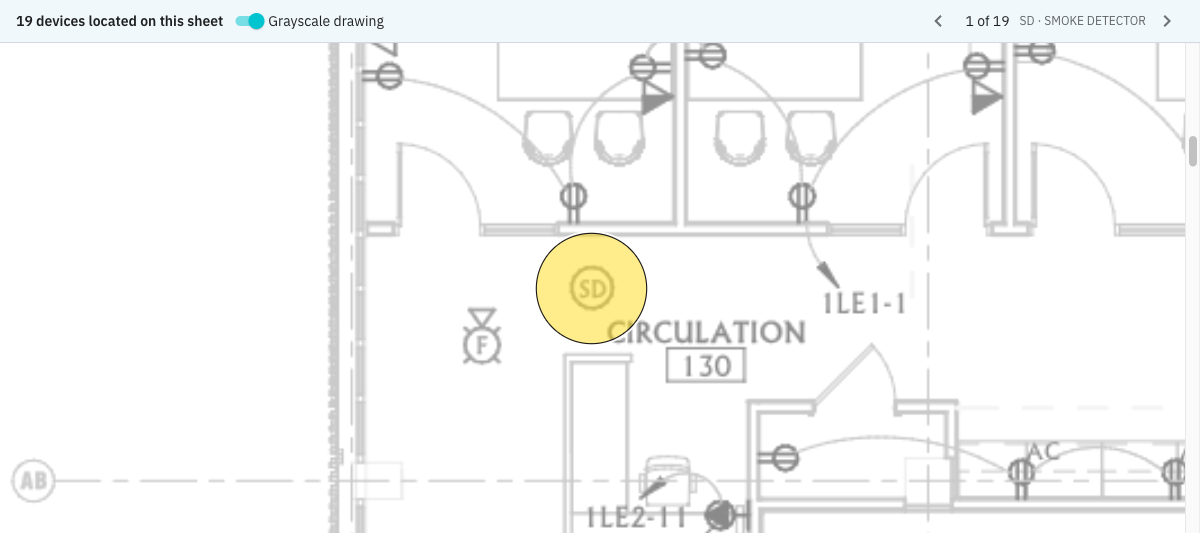
Illustrative plan and counts. Hover a device for its tag and sheet.
A device VendoWorks counts on a drawing can be found on the plan sheet it came from, highlighted where the drawing shows it. Captured from the application before launch: one sheet, nineteen located smoke detectors, and the first three of them. The drawing fades to grey; the device you are checking stays yellow.
A sheet-level count. The project-wide quantity is larger and spans other sheets.
Captured September 14, 2026 from the application, before the 1.0 launch. Pixels unaltered; cropped to exclude title blocks and account controls.

Where the specs and the drawings disagree, VendoWorks surfaces the mismatch instead of silently choosing. Analysis results are reviewed by people before they reach a bid — VendoWorks is not autonomous bidding.
Then price it. Price your extracted BOM from your own catalog. VendoWorks remembers the parts you choose and suggests them on your next project. Set up the lines you put on every bid, such as labor, wire and permits, once. They appear on every project’s BOM, and you can adjust them for each job.
Extracted scope, quantities and their sources come together in a bid package you can check line by line and export to PDF or Excel.
VendoWorks 1.0 is live, and we’re accepting a limited number of design partners. Sign-up is limited to design partners for now.
Our initial focus is low-voltage security and fire protection. Coverage beyond that is not yet confirmed — tell us your trade and we’ll be straight with you about where we are.
Opportunity discovery is scoped to government procurement sources, matched to the trades and regions you work in.
Yes. Price your extracted BOM from your own catalog. VendoWorks remembers the parts you choose and suggests them on your next project. Prices come from the pricing you load, not a live distributor feed.
No. Analysis results are reviewed by people before they reach a bid — VendoWorks is not autonomous bidding.
Every extracted quantity in VendoWorks carries provenance you can review and correct. You check each count against the drawing or spec it came from, and where the specs and the drawings disagree, we surface the mismatch instead of choosing for you.
Sign up and we’ll tell you what we’re building next: which trades we’re reading plans for, how opportunity matching is improving, and how the review workflow is coming along. We’ll be plain about what works and what doesn’t yet. No sales calls.
We’ll write when there’s something worth telling you: which trades we’re reading plans for, how opportunity matching is improving, and how the review workflow is coming along. No sales calls.